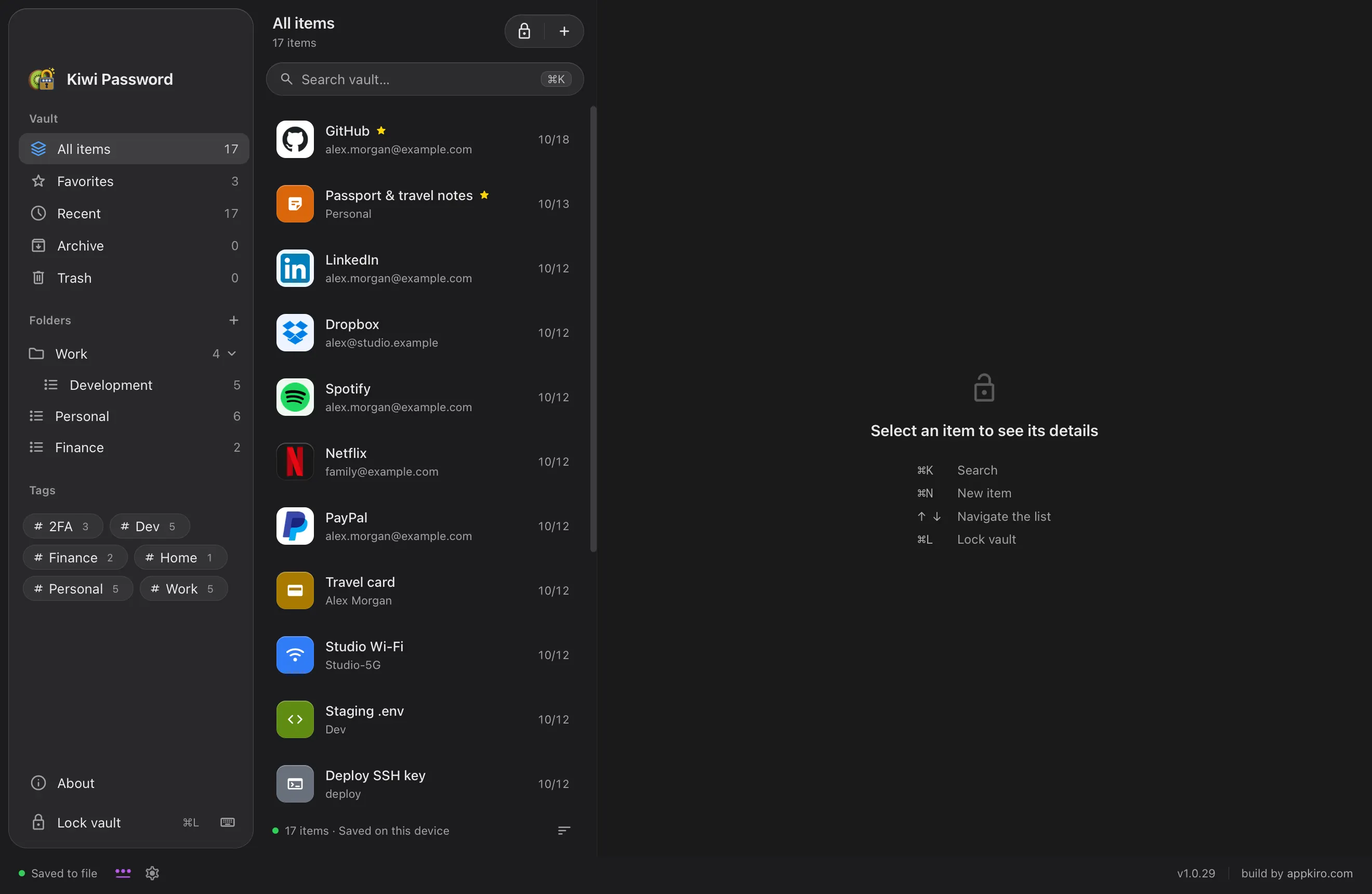
Kiwi Password keeps logins, one-time codes, keys and notes in an encrypted vault file on your Mac. No account to create. No cloud to trust. Just your master password.
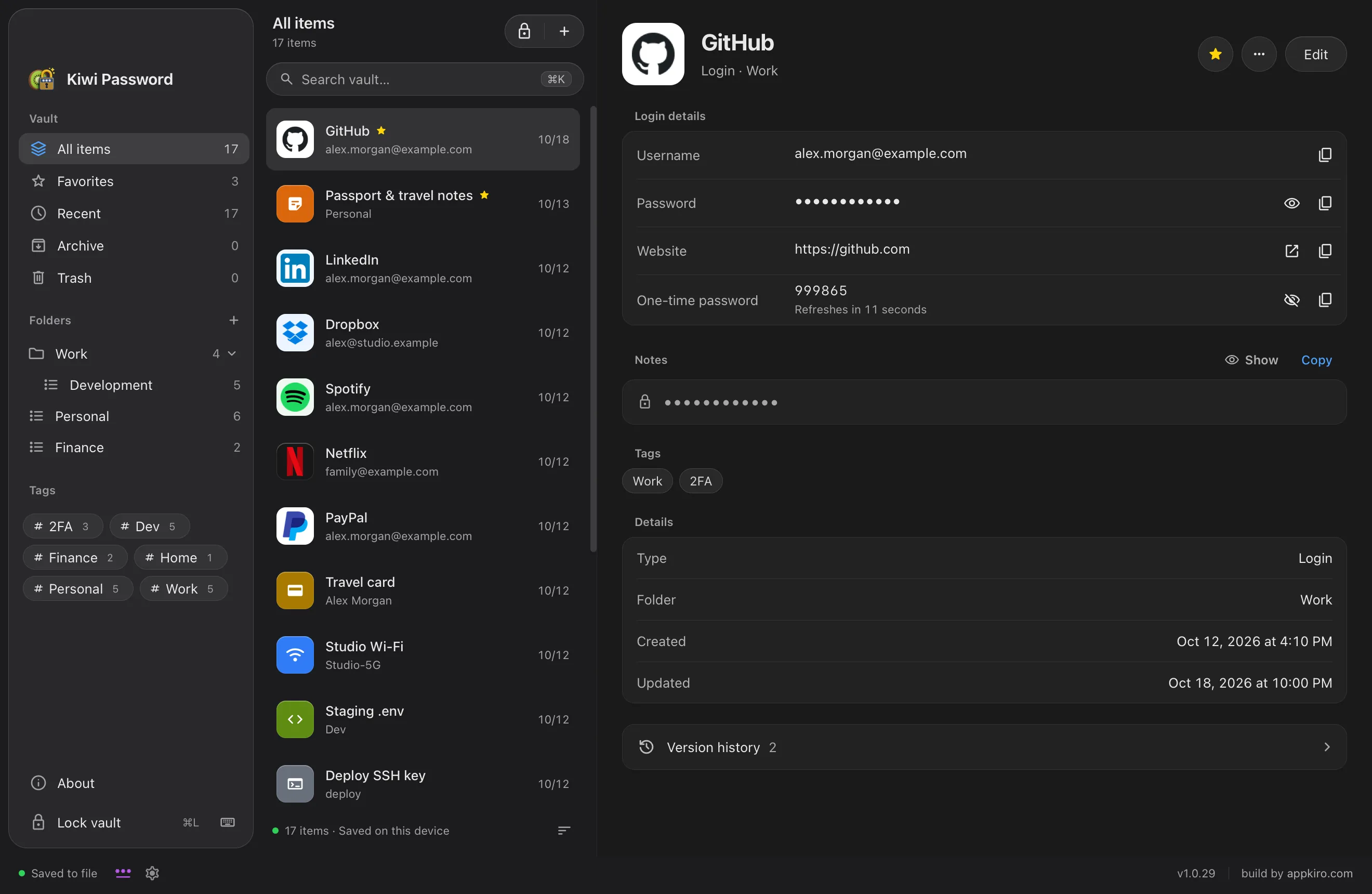
Real Kiwi Password 1.0.29 screens with a sample vault. No personal data is shown.
At a glance
What is Kiwi Password?
Kiwi Password is a local-first password manager for macOS made by AppKiro. It stores your vault as an encrypted .akpr file on your Mac, protected by a master password, and works without an online account, cloud sync or telemetry. It generates strong passwords and passphrases, shows two-factor (TOTP) codes, and imports KeePass databases.
Platform
macOS 13 Ventura or later, universal app for Apple Silicon and Intel
Price
Free download from GitHub Releases
Encryption
AES-256-GCM with an Argon2id key (64 MiB memory)
Storage
One encrypted .akpr file on your Mac; no account, cloud or telemetry
Import
KeePass .kdbx 3.1, 4.0 and 4.1, with optional key file
Languages
English, Vietnamese, Spanish, French and Simplified Chinese
Why Kiwi Password
Private by design. Simple by default.
01
Your vault stays on your Mac.
Everything lives in one encrypted file on your device. There is no account to sign up for, no server copy and no analytics.
02
Encryption you can read about.
AES-256-GCM protects the vault and Argon2id turns your master password into the key. The file format is documented, down to the byte.
03
Two-factor codes, built in.
Keep the one-time code next to the login it belongs to, with a countdown so you never paste an expired one.
04
Bring your KeePass vault.
Preview a .kdbx file before you import it. Groups, history, attachments, tags and OTP settings come along, and the original file is never changed.
Security
Locked down, from the file up.
Every save produces a freshly encrypted vault file. Only the settings needed to unlock it are readable; names, passwords, folders, notes, history and attachments are all inside the ciphertext.
Inside a .akpr vault file
KIROVLT8-byte signature
HeaderVault ID, Argon2id and AES-GCM settings · authenticated
Encrypted vaultEvery entry, folder, note and attachment
Tag128-bit GCM tag
Cipher
AES-256-GCMFresh 12-byte nonce on every save
Key derivation
Argon2id64 MiB memory, tuned to about 0.75 s on your Mac
Master password
12+ charactersRequired for every new vault
Saving
Verified writesEach save is read back before it replaces the last
Password generator
Strong passwords. One click away.
Generate random passwords up to 64 characters or memorable passphrases from the 7,776-word EFF list. Randomness comes from macOS and nothing is sent anywhere.
Passwords from 8 to 64 characters, 20 by default
Passphrases of 4 to 12 words, 6 by default (about 77 bits)
Skip look-alike characters such as 0, O, 1 and l
Live strength meter while you adjust
Two-factor codes
Your 2FA codes, right beside the password.
Paste an otpauth:// link or a setup key and Kiwi Password shows the current code with a countdown. Codes from KeePass entries are imported too.
TOTP codes with 6 to 8 digits
Base32, hex and base64 secrets
Copy username, password or code in one click
Codes shown are from a sample secret.
Everyday protection
It locks itself. And cleans up after you.
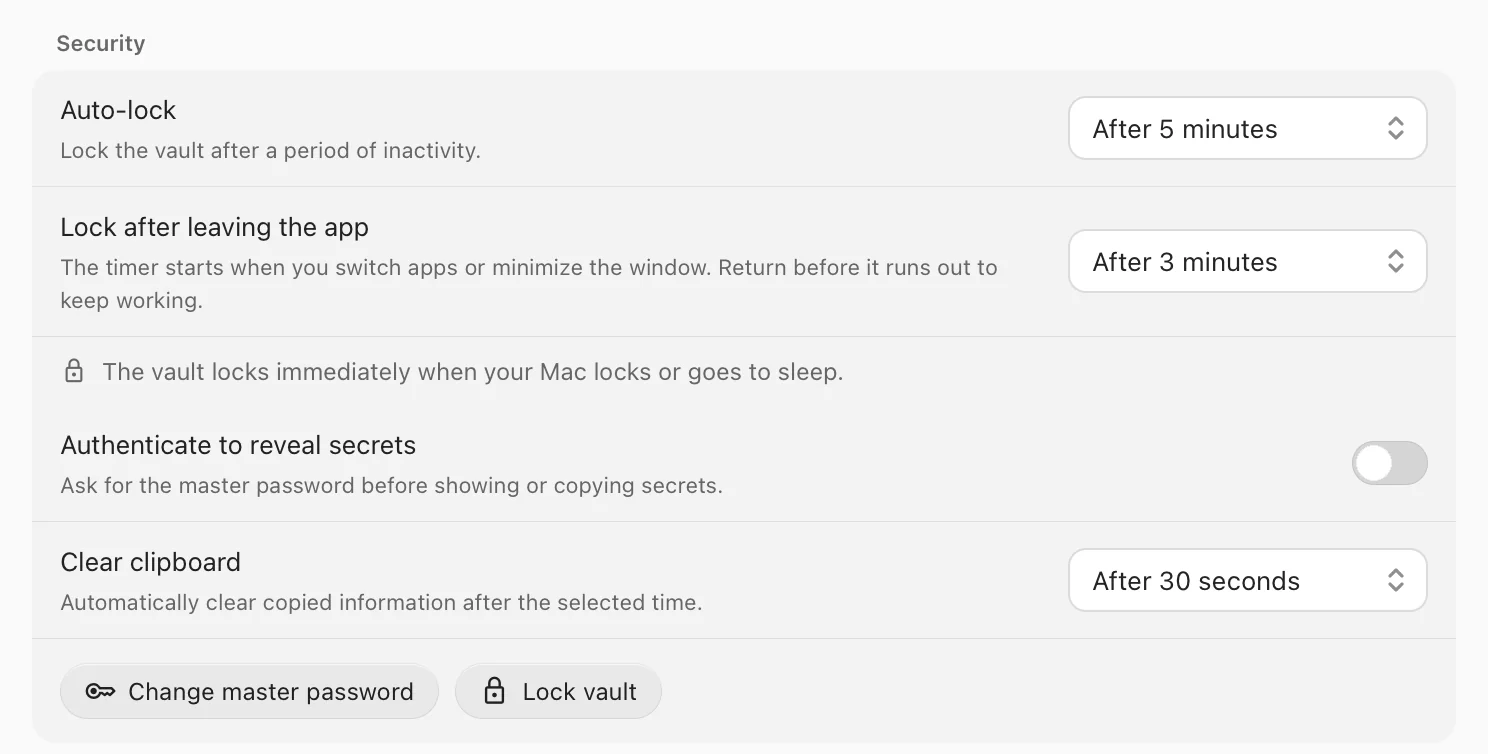
Kiwi Password locks after a period of inactivity and again a few minutes after you switch away. Lock your Mac or close the lid and the vault locks at once. Copied secrets are cleared from the clipboard automatically.
Auto-lock after 1 to 30 minutes of inactivity, 5 by default
Lock after leaving the app, 3 minutes by default
Clipboard cleared after 10, 30 or 60 seconds
Optional master password before revealing secrets
The app window is excluded from screen capture
Everything in one place
Made for the way you actually work.
Ten kinds of entries
Logins, secure notes, .env files, API keys, SSH keys, databases, servers, Wi-Fi, cards and custom secrets, each with the right fields.
Folders, tags and favorites
Nest folders by dragging, filter by tag with live counts, and archive what you no longer use. Deleted items wait in the Trash, ready to restore.
Brand logos that work offline
Pick from 37 bundled brand and bank logos, use an image link, or let a website supply its icon when you save the entry.
Version history
Every edit keeps the previous version, so you can compare changes and restore an older password.
Encrypted backups
An encrypted backup is made before each save, with 10 kept by default. Add an external folder and restore after a preview.
Attachments
Attach files up to 8 MB. Text files such as .env, .json or .pem preview right in the app.
Touch ID unlock
Optionally unlock with Touch ID on Macs that have it. It is set up per vault and needs your master password to turn on or off.
Keyboard first
Search, add, edit, save and lock without reaching for the mouse.
⌘K⌘N⌘E⌘S⌘L
Moving from KeePass
Switch in minutes. Keep everything.
Open a .kdbx database with its password and optional key file, review what will be imported, then create a new Kiwi Password vault. The KeePass file is only read, never written.
KDBX 3.1, 4.0 and 4.1
AES-256 or ChaCha20 databases
AES-KDF, Argon2d and Argon2id keys
Groups, history, attachments, tags and TOTP settings
Native feel
At home on your Mac. Light or dark.
Kiwi Password follows your system appearance, adapts to small windows, and lets you choose between three layouts, compact rows and reduced motion. Use it in English, Vietnamese, Spanish, French or Simplified Chinese.
Light, Dark or System
Three layouts
Compact rows
Reduced motion
5 languages
Gallery
Take a closer look.
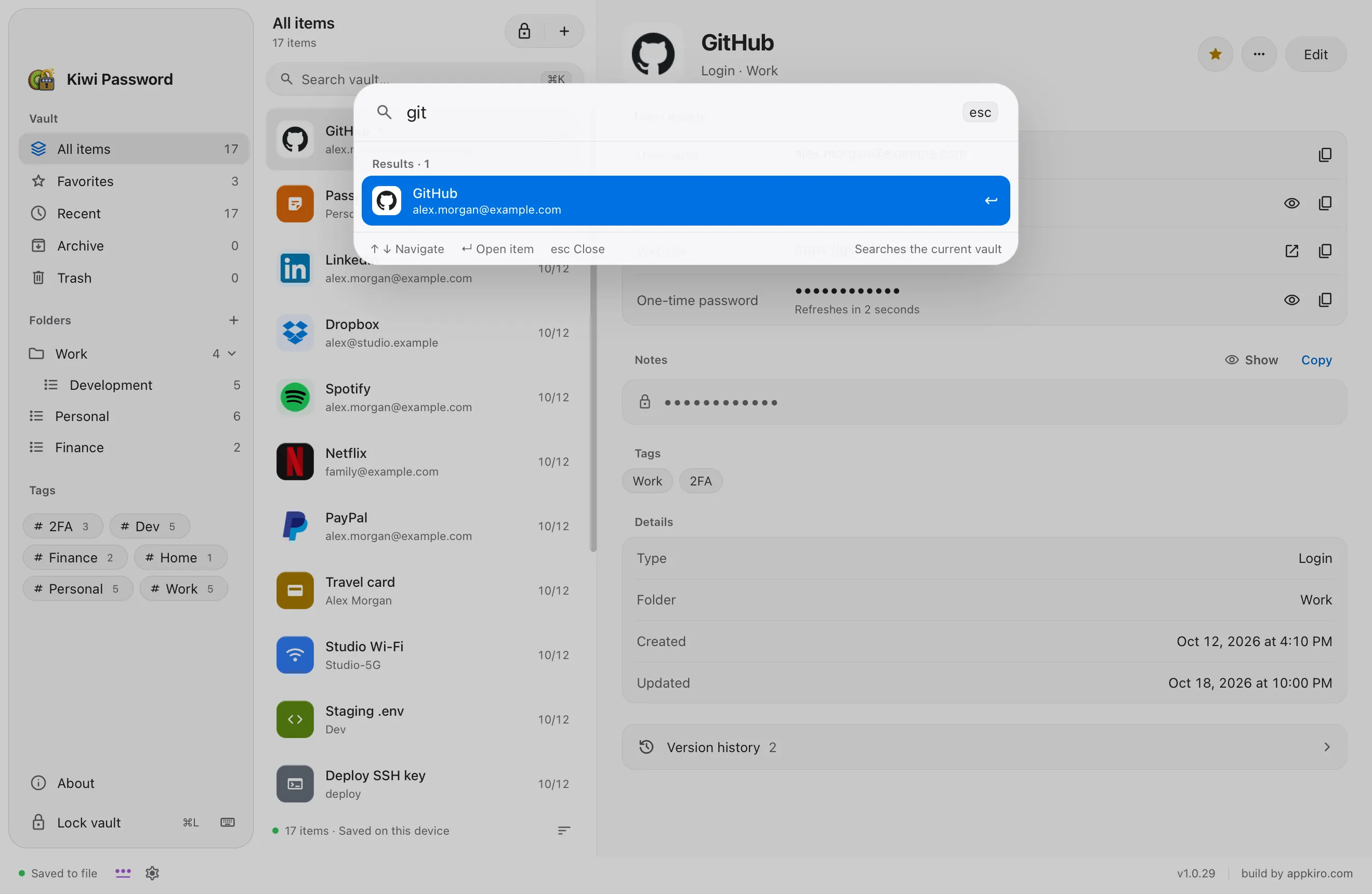
Search. Press ⌘K and find any entry as you type. Secret fields are never searched.
Captured from Kiwi Password 1.0.29 with a sample vault. Accounts and secrets are fictional.
Honest about privacy
What connects to the internet. And what never does.
Never
Your passwords, entries or master password
An account, sign-in or cloud sync
Analytics, ads or tracking
Only when needed
Checking GitHub Releases for app updates, which are signature-verified before install
Fetching an entry’s website icon when you create or edit it (only the site address is sent)
Your vault never leaves your Mac. Nothing is uploaded, synced or shared — not your passwords, not your notes, not even the names of your entries. The only copy of your data is the one you keep.
Download
Get Kiwi Password.Free for Mac.
Checking for the latest version…
InstallInstall in four steps.
1
Download the DMG
One universal installer for Apple Silicon and Intel Macs.
2
Drag to Applications
Open the DMG and drag Kiwi Password into the Applications folder.
3
Open Kiwi Password
Double-click the app. If macOS asks you to confirm the first launch, choose Open Anyway in System Settings › Privacy & Security, or Control-click the app and choose Open.
4
Create your vault
Choose a master password of at least 12 characters, or import a KeePass database.
Getting started
Your first five minutes.
1
Create a vault
Name it and set a master password. The vault is saved as an encrypted .akpr file you can move or back up like any document.
2
Add your first logins
Press ⌘N, pick a type such as Login, and fill in the fields. Use the generator to replace weak passwords as you go.
3
Add two-factor codes
Paste the setup key or otpauth:// link from a service into the One-time password field to see live codes.
4
Find and copy in seconds
Press ⌘K, type a few letters and copy what you need. The clipboard clears itself after 30 seconds.
5
Lock when you step away
Press ⌘L, or just leave: the vault locks on its own and when your Mac locks.
FAQ
Questions and answers.
What is Kiwi Password?
Kiwi Password is a free password manager for macOS from AppKiro. It keeps your logins, two-factor codes, API keys, SSH keys, cards and notes in an encrypted vault file on your Mac, without an online account or cloud sync.
Is Kiwi Password free?
Yes. The Mac app is a free download from the official GitHub Releases page linked on this site. There is no account and no subscription.
Where are my passwords stored?
In an encrypted .akpr file on your Mac, by default in ~/Library/Application Support/Kiro Vault. You can move the vault to another folder, such as one you sync yourself, and add an external backup folder in Settings.
How does Kiwi Password encrypt my vault?
The vault is encrypted with AES-256-GCM. The key comes from your master password through Argon2id with 64 MiB of memory and a random salt, tuned to take about three quarters of a second on your Mac. Every save uses a new random nonce.
Does Kiwi Password sync between devices?
No. Kiwi Password has no cloud sync. If you want the vault on another Mac, you can keep the .akpr file in a folder you sync yourself or copy an encrypted backup.
What happens if I forget my master password?
It cannot be reset or recovered, because nobody else holds a copy of your key. If you set up Touch ID for the vault you can still unlock with it, and backups open with the password they were created with.
Can I import passwords from KeePass?
Yes. Kiwi Password imports KeePass .kdbx files (KDBX 3.1, 4.0 and 4.1), including those that use a key file. You see a preview before anything is created, and the original file is never modified. CSV import and KDBX export are not available.
Does Kiwi Password support two-factor authentication codes?
Yes. Add a TOTP setup key or otpauth:// link to an entry and the app shows the current 6- to 8-digit code with a countdown. QR code scanning is not supported.
Does Kiwi Password collect any data?
No. There is no account, analytics, advertising or tracking. The app only goes online to check for signed updates on GitHub and, when you create or edit an entry, to fetch that website’s icon.
Which Macs can run Kiwi Password?
Any Mac with macOS 13 Ventura or later. The app is universal, so one download runs natively on both Apple Silicon and Intel Macs.
Why does macOS ask me to confirm the first launch?
macOS can ask you to confirm the first time you open an app downloaded from the internet. Download Kiwi Password only from this page or its official GitHub releases, then choose Open Anyway in System Settings › Privacy & Security, or Control-click the app and choose Open.
Is Kiwi Password safe to use?
Kiwi Password never sends your data anywhere. Your vault stays in one file on your Mac, encrypted with AES-256-GCM and a key derived from your master password with Argon2id, and the app locks itself when you step away. There is no server that could be breached because there is no server holding your data.