Work stays with work.
Use separate sign-ins and settings for your day job, side projects and client accounts. Names and colors help you pick the right profile.
Keep work, personal and client profiles separate across Claude, Codex and Antigravity. The right sign-in, settings and project — ready when you are.
Early access for macOS · Apple notarization pending
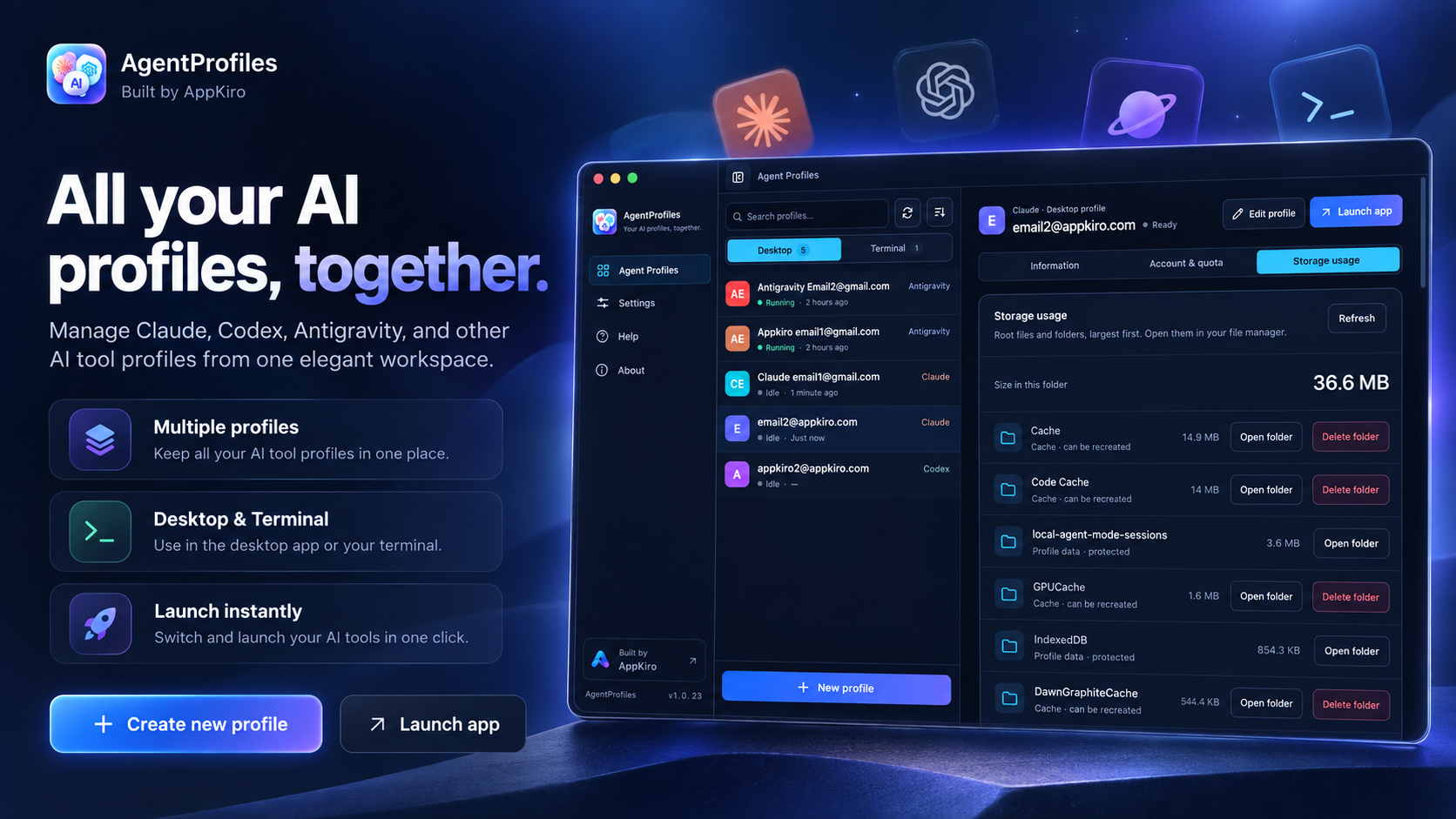
A familiar home for the tools you already use
DOWNLOAD AGENTPROFILES
Available now for Mac. Choose your platform below.
Universal DMG · Apple Silicon & Intel · macOS 11+
Windows 10+ · Installer in preparation
Linux desktop · Installer in preparation
This early access Mac build supports Apple Silicon and Intel. It is not notarized by Apple, so macOS may require approval in Privacy & Security before opening. Windows and Linux downloads will appear here when available.
AgentProfiles is a native desktop profile manager for Claude Desktop, Codex Desktop, Antigravity Desktop, Claude Code and Codex CLI. It launches the tools you already have installed with separate local profiles, so work, personal and client sign-ins can stay organized in one place.
LESS ACCOUNT JUGGLING. MORE FLOW.
Give every context its own home. Pick a profile and get back to what you were doing.
Use separate sign-ins and settings for your day job, side projects and client accounts. Names and colors help you pick the right profile.
Save an agent, terminal profile, editor and project as a workspace. Reopen it in VS Code, Cursor, Windsurf or Antigravity.
Request a usage check for a selected profile. See available limits, reset times and the last successful check when the provider supports them.
YOUR NEXT SESSION STARTS HERE
Install AgentProfiles and the Desktop app or CLI you want to use. AgentProfiles checks whether it is available.
Create a profile, give it a name and color, then launch it. New profiles start signed out; sign in with the account you want to use.
Launch that profile again or save a terminal workspace with your editor and project. Your profile keeps its own local settings.
AgentProfiles Local AgentProfiles Workspaces Settingsv1.0.243 sample profiles
Claude
A dedicated space for your day job.
Example only · actual limits come from your provider
Interactive illustration · sample profiles and usage
DESKTOP, TERMINAL & YOUR EDITOR
macOS is the primary tested platform. Windows support is implemented and still being verified. Install the original tools separately.
| Tool | Profile type | Platform & current scope |
|---|---|---|
| Claude Desktop | Desktop | macOS 11+; Windows 10+ verification in progress |
| Codex Desktop | Desktop | macOS; two real accounts running together still need verification |
| Antigravity Desktop | Desktop | macOS; two real Google accounts still need verification |
| Claude Code | Terminal + IDE | macOS; Windows verification in progress |
| Codex CLI | Terminal + IDE | macOS; Windows verification in progress |
IDE integration applies the selected profile to integrated terminals. Separately installed IDE extensions manage their own sign-ins.
OUR PRIVACY COMMITMENT
AgentProfiles does not collect personal data for the developer, track your activity or sell your data. Profile names, settings, project paths and saved workspaces stay on your computer, without syncing to an AgentProfiles server.
For a Claude Desktop usage check, AgentProfiles reads the selected profile’s saved session and may request OS Keychain access. Profile separation is not a security sandbox, and the same account still shares its provider’s cloud data.
Last updated: September 23, 2026
This policy applies to the AgentProfiles desktop app and its local profile management. You do not need an AgentProfiles account to use the app.
The app does not send your profile names, email addresses, credentials, conversations or project contents to the AgentProfiles developer. It has no telemetry, advertising trackers or behavioral analytics. AgentProfiles does not sell or monetize your personal data.
Profile settings, local data directories and saved workspace bindings are stored on your computer. Sign-in information is managed locally by the original tools through their profile storage or the operating system’s credential service. AgentProfiles does not provide a server that stores or synchronizes this data. Usage-check results stay in memory and are excluded from settings backups.
The original AI tools connect to their providers for sign-in, conversations and cloud services under those providers’ privacy policies. A usage check contacts the selected provider directly or its local backend. For Claude Desktop, the selected profile’s session is used only with claude.ai; it is not sent to AgentProfiles. Update checks and downloads connect to GitHub, which receives ordinary connection information such as your IP address. Local profile storage does not mean that third-party AI services operate offline.
You can manage and remove profiles in the app. Removing a profile and deleting its saved data are separate choices where the app offers them; review the deletion options before confirming. Copies you export or place in a cloud-synced folder remain under your control. Removing local data does not delete the original provider’s account or cloud history.
If you contact [email protected], the developer receives the email address and information you choose to send in order to answer your request. Avoid sending passwords, tokens or private conversations. The AppKiro website has a separate privacy policy covering website analytics; the desktop app’s no-telemetry commitment does not apply to website visits.
The AgentProfiles desktop app does not send personal data to its developer and has no telemetry or behavioral tracking. Profile settings and workspace bindings are stored on your computer, without an AgentProfiles cloud service. The original AI tools still connect to their providers; usage checks contact the selected provider or local backend, and update checks connect to GitHub. Information you voluntarily email for support is received by the developer.
Yes. AgentProfiles launches Claude Desktop profiles with separate local data directories, so you can sign in to different accounts. Claude Code profiles also use separate configuration directories. If you sign in to the same Claude account in several profiles, that account’s cloud history is still shared.
Yes. Codex Desktop and Antigravity Desktop profiles are implemented on macOS, and Codex CLI supports separate terminal profiles. Simultaneous Desktop sessions with two real Codex accounts or two real Google accounts still need verification. Antigravity CLI profiles are not supported.
Windows 10+ support is implemented and is still being verified. macOS 11+ is the primary tested platform. Codex Desktop and Antigravity Desktop integrations currently apply to macOS. Check the available release assets before choosing an installer.
No. AgentProfiles organizes profiles for tools and accounts you already use. It does not include an AI subscription, pool quotas or increase provider limits. The provider’s plan, billing and account rules still apply.
You can request a check for a selected profile. Support depends on the installed tool, authentication and provider API. Codex subscription limits are separate from API billing; Antigravity must be running and signed in. Real subscription responses and Windows credential decryption still need live verification. Unavailable usage is not shown as a full quota.
VS Code, Cursor, Windsurf and Antigravity. A saved workspace combines an agent, terminal profile, editor and project. The selected profile is applied to the editor’s integrated terminals; a separately installed IDE extension keeps its own environment and authentication.
No. AgentProfiles is an independent companion app by AppKiro. It is not affiliated with or endorsed by Anthropic, OpenAI or Google. The supported tools must be installed separately.
Use the AppKiro GitHub releases page to check for published installers, or contact the developer at [email protected]. Installer availability depends on the release and platform.