
Estimate Blockchain Gas Fees Before You Send a Transaction
A gas fee is the small network charge you pay to get a blockchain transaction processed. Appkiro's Gas Fee Calculator helps you estimate that cost before you send tokens, swap on a DEX, mint an NFT, bridge funds, or approve a smart contract. You enter the gas used, gas price, and token price, and the tool converts the estimate into the network token and USD.
The simple idea
Think of gas like paying for work on the network. A simple transfer uses a small amount of work. A swap, bridge, NFT mint, or contract approval usually uses more work. The total fee depends on two things: how much work the transaction needs and how expensive each unit of work is at that moment.
Gas used
How many units of network work the transaction is expected to consume.
Gas price
How much you pay for each gas unit, usually written in Gwei.
Estimated fee
Gas used multiplied by gas price, converted into ETH, POL, or another network token.
The formula without the jargon
The calculator uses this formula:
Example: a normal ETH transfer often uses about 21,000 gas. If gas price is 23 Gwei, the fee is 21,000 x 23 / 1,000,000,000 = 0.000483 ETH. If ETH is 3,238.65 USD, that is about 1.56 USD.
How to use the calculator
- Choose the network. Pick Ethereum Mainnet, Arbitrum One, Polygon, Optimism, or Base. The network decides which token is used to pay the fee.
- Choose the transaction type. Transfer, Swap, Mint NFT, Bridge, and Approve presets fill a common gas limit for that action.
- Pick the speed. Slow is cheaper, Standard is balanced, and Fast assumes a higher gas price for quicker confirmation.
- Edit gas limit and gas price if needed. Use wallet or explorer values if you want a more current estimate than the static suggestion.
- Edit token price. This changes only the USD estimate. It does not change the fee in ETH, POL, or the native token.
- Copy or export the result. Use Copy Result or Export JSON when comparing several transaction options.
What every setting means
Network
The blockchain where the transaction happens. Ethereum and Base use ETH for fees. Polygon uses POL in this tool. L2 networks often have much lower gas price values than Ethereum Mainnet.
Transaction Type
The kind of action you plan to send. A simple transfer is cheaper because it does less work. Swaps, bridges, and NFT mints usually run smart contract code, so they need more gas.
Gas Mode / Speed
A simple speed preset. Slow uses a lower reference gas price, Standard is a middle estimate, and Fast uses a higher estimate. It helps you compare cost versus confirmation speed.
Gas Used / Gas Limit
The maximum amount of gas units the transaction may consume. A wallet may call this Gas Limit. If the transaction uses less, the unused portion is normally not spent.
Gas Price
The price you pay for each gas unit. It is entered in Gwei, where 1 Gwei is one-billionth of ETH or the native unit used for gas pricing.
Native token price
The USD price reference used to convert the native fee into dollars. It is editable because the tool does not fetch live market prices.
Use static gas suggestion
When enabled, changing the network or speed updates the gas price from the tool's built-in reference values. Turn it off if you want to type your own number.
Common Presets
Quick gas limit shortcuts for common transaction types. They are estimates, not guarantees, because every contract can use a different amount of gas.
How to read the result
Estimated Gas Fee
The estimated fee in the network token, such as ETH or POL, plus an approximate USD value.
Token Used For Fee
The native token required by the selected network to pay validators or sequencers.
Priority Fee
A speed-related tip estimate. Higher priority can help confirmation, but it can cost more.
Max Fee Per Gas
A buffered estimate of the maximum gas price for the selected mode. Wallets may use their own live value.
The result panel separates the important values so you do not have to guess what changed. If the native fee stays the same but USD changes, only the token price changed. If gas price changes, the network fee changes. If gas limit changes, the expected transaction complexity changed.
Screenshot
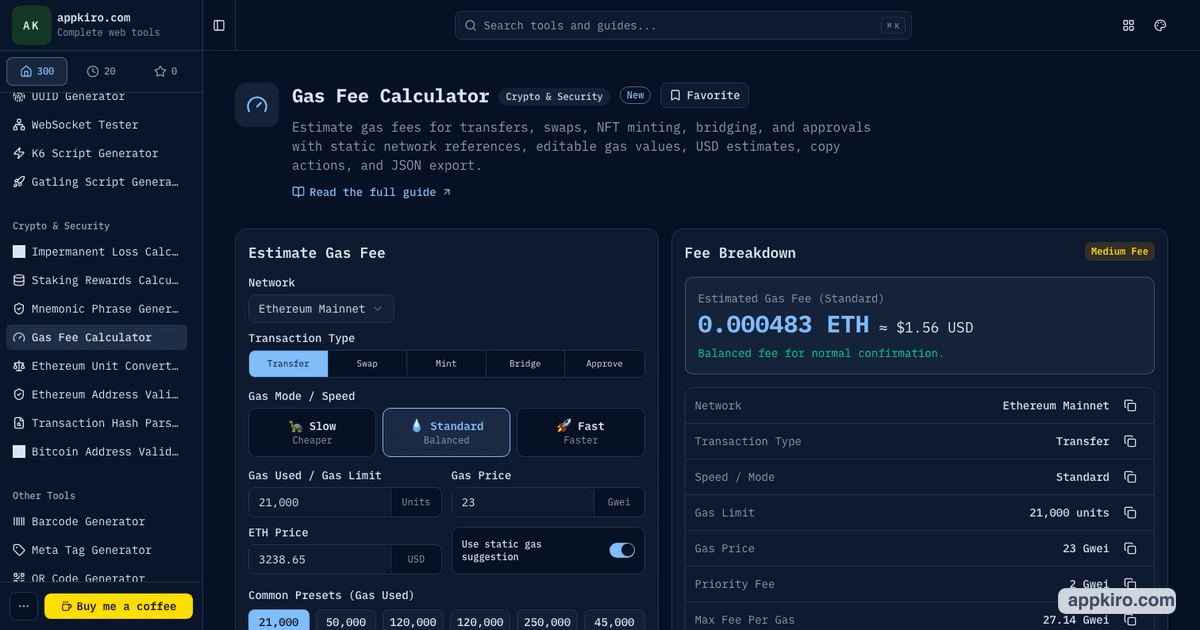
Why your final wallet fee can differ
This tool uses static reference estimates and your manual inputs. Real wallet fees can differ because network congestion changes quickly, wallets simulate transactions, smart contracts use different amounts of gas, L2 networks may add extra costs, and the final priority fee or max fee may be adjusted before confirmation. Always confirm the fee in your wallet before approving a transaction.
Related tools
FAQ
What is a gas fee in simple words?
A gas fee is the network cost you pay so validators or block producers process your transaction. It is separate from the amount you are sending.
What formula does the Gas Fee Calculator use?
The calculator uses Gas Fee = Gas Limit x Gas Price. Because gas price is entered in Gwei, the result is divided by 1,000,000,000 to show the fee in the network token.
Why can my wallet show a different fee?
Wallets use live network conditions, priority fee rules, max fee settings, L2 costs, and transaction simulation. Appkiro's calculator uses editable static estimates for planning.
Is a higher gas fee always better?
No. Higher gas may confirm faster when the network is busy, but it can also waste money if the network is quiet or the transaction is not urgent.
Can I use this for Arbitrum, Polygon, Optimism, and Base?
Yes. Choose the network, review the native fee token, and edit the gas price or token price if you have a more current reference.