
Help · Video tools
Convert Video Between MP4, WebM, MKV, and MOV in Your Browser
Most video format problems are container problems. The codec might be fine, but the wrapper around it does not match what the destination expects.
This guide covers when to pick MP4, WebM, MOV, or MKV, what each platform actually wants, and how the quality and resolution settings affect the final file.
Quick answer
Pick MP4 unless the destination specifically asks for something else. WebM for web embeds that want smaller files. MOV for Apple-first workflows. MKV for personal archiving. The tool decodes and re-encodes the video in your browser; nothing is uploaded.
Container and codec choices
| Container | Codecs supported | Best for |
|---|---|---|
| MP4 | H.264, H.265 (HEVC) | Universal default. Works on iOS, Android, Windows, macOS, every browser, every video player. |
| WebM | VP9, AV1 | Web embeds, smaller file size at similar quality, native to Chrome and Firefox. Apple support is partial. |
| MOV | H.264, H.265, ProRes | macOS and Final Cut Pro source format. Drag-and-drop friendly on Apple platforms, large file sizes. |
| MKV | Anything | Local archive, multi-audio, subtitle tracks. Great for personal storage, poor for upload targets. |
What each platform actually wants
| Platform | Best format | Notes |
|---|---|---|
| Twitter / X | MP4 (H.264, AAC audio) | Max 512 MB, 2:20 length for free tier. |
| Instagram Reels | MP4 (H.264) | 9:16 aspect, max 60s for Reels, 1080×1920. |
| YouTube | MP4 (H.264 or H.265) | Up to 4K supported, AAC or Opus audio. |
| TikTok | MP4 (H.264) | 9:16 vertical, max 287s upload. |
| Discord | MP4 (H.264) | Free tier: 10 MB; Nitro: 500 MB. |
| Slack | MP4 (H.264) | Inline preview works for MP4 across desktop and mobile. |
| iMessage / AirDrop | MOV or MP4 (H.264) | MOV plays natively on iOS without a re-encode. |
| Web embed | MP4 (H.264) with WebM (VP9) fallback | Serve both via <source> for best coverage. |
Step-by-step workflow
Load the video
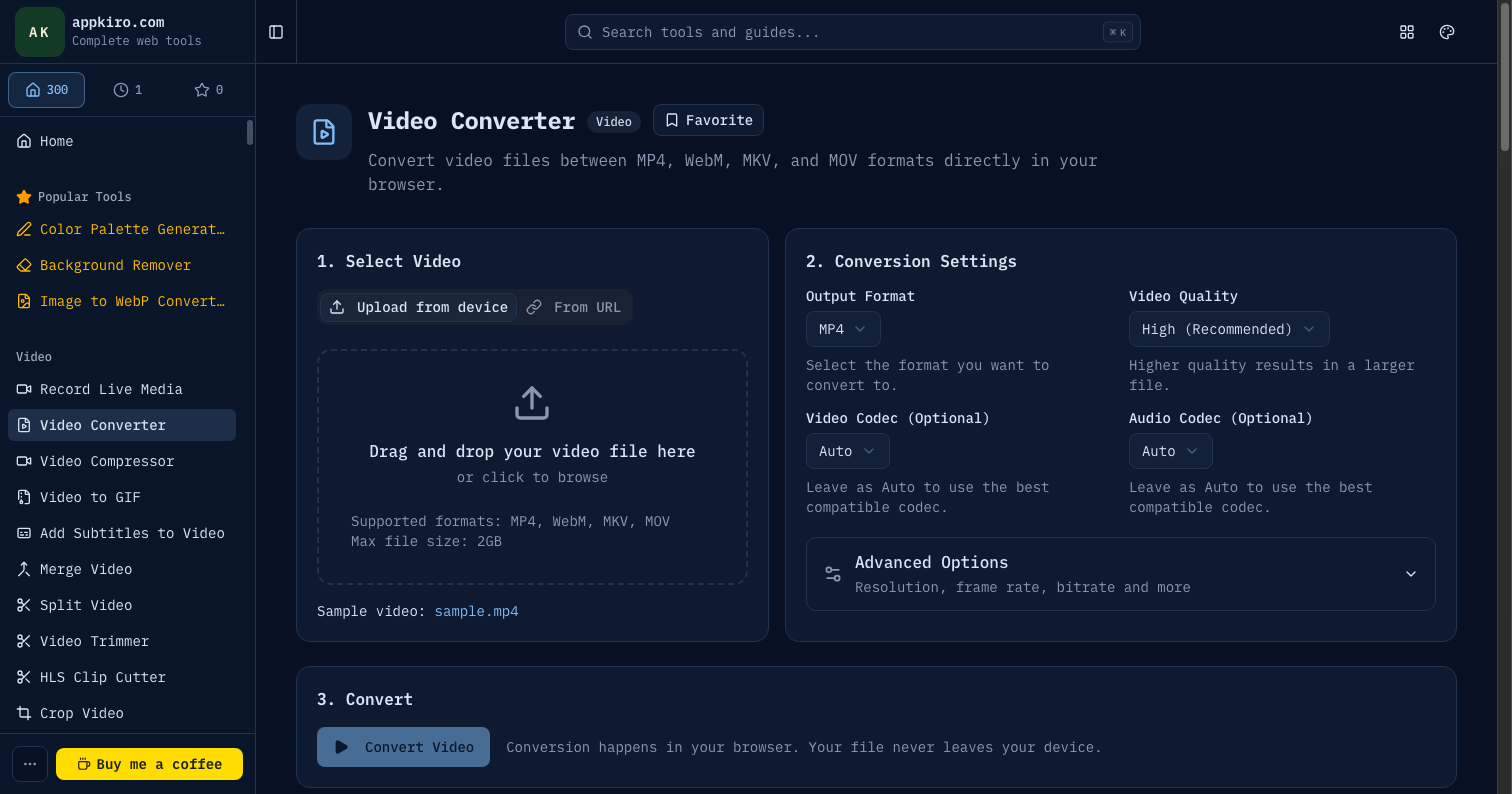
Drag and drop the file, click to browse, or paste a direct URL on the From URL tab. The tool accepts MP4, MOV, WebM, MKV, and M4V up to 2 GB.
Pick the target container
MP4 for broad compatibility, WebM for smaller web files, MOV for Apple workflows, MKV for local archiving. The codec choices change to match.
Choose a quality preset
High preserves visual fidelity at larger file sizes. Medium is a sensible default for upload-ready clips. Low produces small files suitable for chat or quick previews.
Optionally adjust resolution
Downscale large source video to a target resolution (1080p, 720p, 480p) when the destination does not need 4K. Lower resolutions encode faster and produce smaller files.
Convert and preview
Click Convert. A progress bar reports encoder progress. When it finishes, the converted file appears with an inline preview player.
Download
Save the file in the new container. The original stays on your device; the conversion never leaves the browser.
Settings worth understanding
- Container vs codec
- The container is the file wrapper (MP4, WebM, MKV, MOV). The codec is the compression algorithm inside it (H.264, H.265, VP9, AV1). A given container supports specific codecs; the tool only exposes valid combinations.
- Quality preset
- Low, Medium, High map to encoder bitrate ladders calibrated for typical content. High is closest to lossless, Low is the smallest file. There is no truly lossless option — every conversion is lossy.
- Resolution
- Downscaling is the single biggest lever for file size. A 4K source downscaled to 1080p shrinks the file by roughly 4x at the same per-pixel quality. Upscaling does not improve quality and is rarely worth doing.
- Hardware acceleration
- When the browser supports WebCodecs with hardware encoding (mostly Chrome and Edge on modern hardware), encoding runs several times faster than on CPU. Safari and Firefox often fall back to CPU encoding.
- Audio track
- Audio is converted along with the video, usually to AAC (MP4, MOV) or Opus (WebM). Audio rarely dominates file size; leave it on default unless you have a specific reason to change it.
- Re-encoding cost
- Every conversion re-encodes the video, even when the output codec matches the source. Repeated conversions stack generation loss. For multiple edits, convert once at the end.
Realistic scenarios
Phone video for sharing on Twitter
Drop the MOV from your iPhone, pick MP4 + Medium quality + 1080p. The result is a Twitter-ready H.264 MP4 in under a minute.
OBS screen recording for Discord
Convert the MKV from OBS to MP4 at Medium quality and 720p. The output meets Discord's 10 MB free tier limit for short clips.
Final Cut Pro export to web embed
Convert the MOV master to WebM (VP9) at High quality. Embed both the WebM and a fallback MP4 using the <source> element in HTML5 video.
Personal archive of phone videos
Convert a batch of MP4s to MKV with the original codec. MKV is the most flexible container for long-term storage and supports any future audio or subtitle tracks you add.
Game clip for a Slack message
Convert MKV to MP4 at Low quality and 720p. File sizes drop to a few megabytes while staying watchable inline on mobile and desktop Slack.
Privacy
Videos are decoded and re-encoded inside the browser via the WebCodecs API. No upload, no server processing, no account. URL mode fetches public files directly from the host you paste — CORS and Range request rules apply.
Tips for clean conversions
- MP4 + H.264 is the answer to most format questions. Pick something else only when the destination explicitly prefers it.
- Downscale aggressively for clips that will be viewed at small sizes — 720p is more than enough for Slack, Discord, and most chat embeds.
- If a codec is missing from the dropdown, your browser cannot encode it. Try Chrome or Edge for broader codec coverage.
- Convert once at the end of an editing workflow. Repeated conversions stack quality loss.
- Test playback on the actual destination before committing to a batch convert. iMessage, Slack, and email clients each have quirks.
Related video tools
Video Compressor
Target a specific file size with bitrate-based compression.
Video Trimmer
Cut the clip down before converting to save encoding time.
Video Resizer
Change resolution explicitly when format conversion alone is not enough.
Video to Audio
Extract the audio track when the video itself is not needed.
Frequently asked questions
- Is my video uploaded to a server?
- No. The video is decoded, re-encoded, and saved entirely in your browser using WebCodecs. The source file never leaves your device.
- Why is one of the output formats greyed out or failing?
- Encoding depends on browser-supplied codecs and, for large files, on hardware acceleration. Chrome and Edge support the broadest set. Safari is limited for VP9 and AV1.
- Can converting improve video quality?
- No. Conversion can change container, codec, resolution, and bitrate, but it cannot restore detail that was lost in the original encoding.
- What file size limit applies?
- Local files are capped at 2 GB. Very large videos can still exhaust browser memory during encoding, especially on devices with limited RAM. Downscale resolution or pick a lower quality preset for safety.
- Does the converter preserve subtitles or chapters?
- No. Subtitle tracks and chapter markers are dropped during conversion. If you need to keep them, add them after conversion or work in a desktop tool such as MKVToolNix.
- Can I batch convert multiple files?
- The tool processes one file at a time. For batches, repeat the conversion with the same settings for each file — the choices stay set between runs.
- When should I pick H.265 instead of H.264?
- H.265 produces roughly half the file size at the same visual quality, but encoding is slower and playback is not universal on older devices. Use H.264 when in doubt, H.265 for archive or modern-only audiences.
- Will MP4 from this tool play in QuickTime?
- Yes. The MP4 output uses standard H.264 + AAC, which QuickTime, Final Cut Pro, iMovie, and every modern Apple application accept directly.
Ready to convert?
Drop a video, choose the target container and quality, and download the result. Everything runs locally.