
Your 2FA codes in Chrome, without your phone
Generate and manage TOTP two-factor authentication codes right in your browser. Operates 100% offline with a local AES-256-GCM encrypted vault. Copy verification codes with a single click.
- TOTP authentication codes right in Chrome — no phone required
- Zero-knowledge security with local AES-256-GCM encrypted vault
- 100% offline, zero telemetry, no account required
Why an in-browser 2FA authenticator is better
Reaching for your phone every time you log in slows you down. 2Fa Live streamlines your workflow without compromising security.
The Mobile Detour
Pick up phone, unlock, locate app, memorize code, manually re-type into Chrome. Prone to typos and distraction.
With 2Fa Live
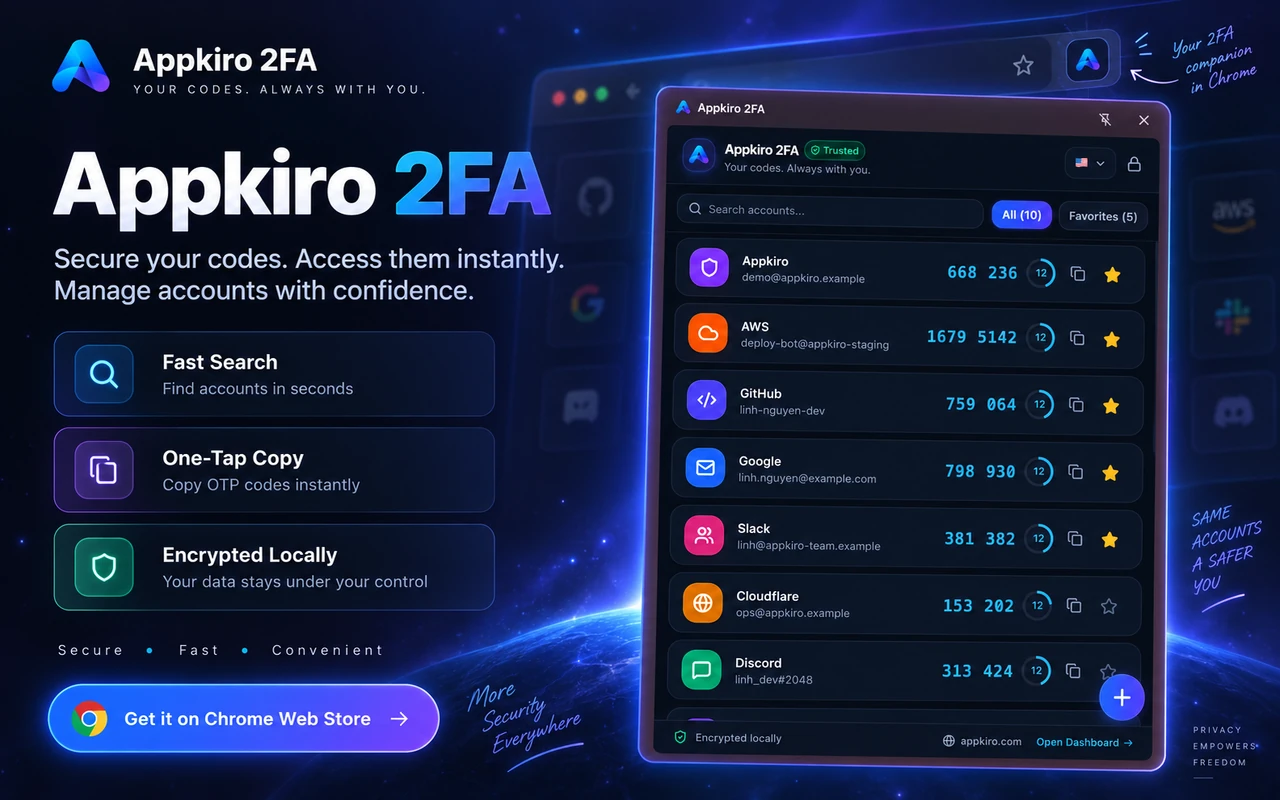
Click the toolbar icon or hit ⌘K, tap the account, and paste the code instantly. Frictionless and precise.
Why AppKiro
Why an in-browser 2FA authenticator is better
Reaching for your phone every time you log in slows you down. 2Fa Live streamlines your workflow without compromising security.
Stop reaching for your smartphone
Copy verification codes straight from your browser tab without interrupting your focus or getting distracted by phone notifications.
Never lose accounts to lost or broken phones
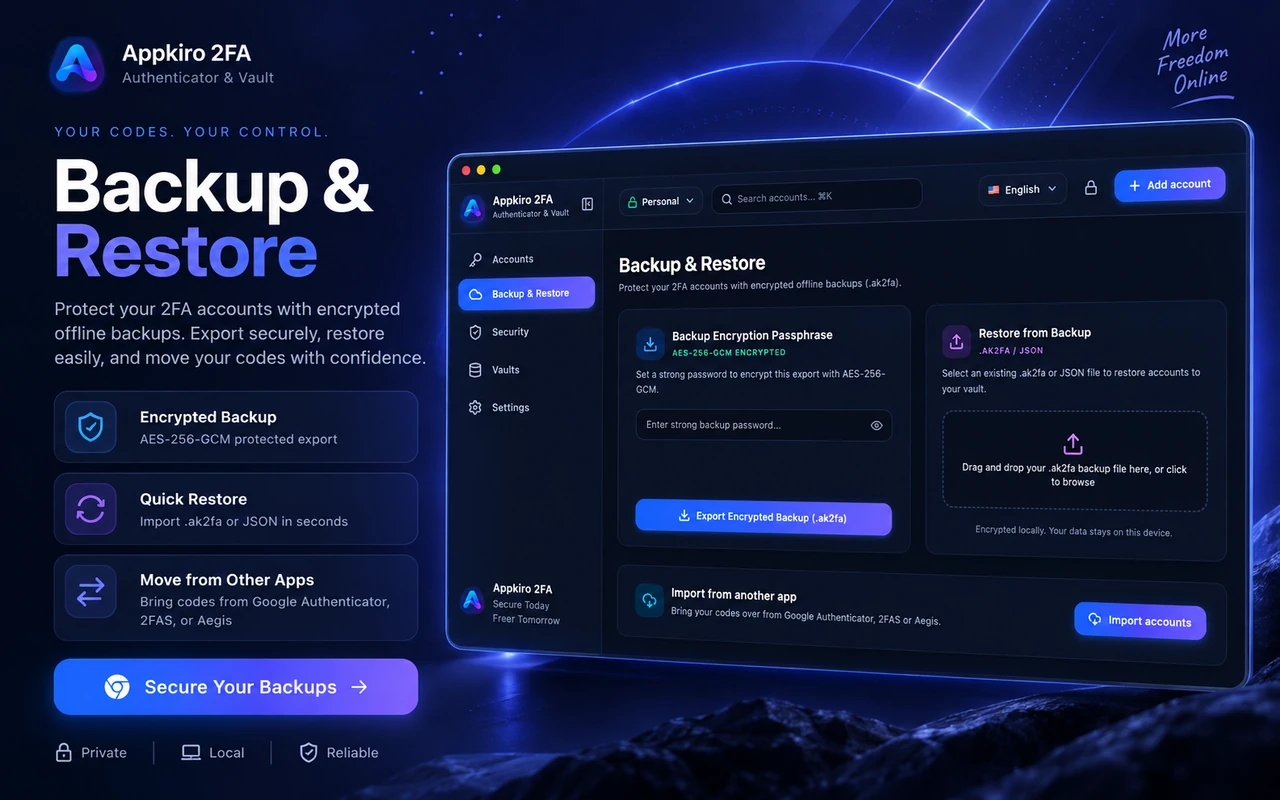
Hardware phones get dropped, lost, or wiped. With encrypted .ak2fa backups, your access can be restored to any machine in seconds.
Pin to Chrome's persistent Side Panel
Keep your authenticator visible beside your work window for rapid multi-system logins throughout the workday.
Zero-Knowledge Architecture
Everything you need from a modern desktop authenticator
Your OTP secrets never leave your device unencrypted. Master keys are derived on your computer and secrets are wiped from RAM when locked.
AES-256-GCM Vault Encryption
All account records, issuer tags, and Base32 secrets are encrypted at rest using military-grade AES-256 in Galois/Counter Mode for authenticated integrity.
PBKDF2 Key Derivation (100,000 Rounds)
Your master password derives the vault encryption key using PBKDF2-HMAC-SHA256 with 100,000 iterations and a cryptographically random salt, repelling brute-force attacks.
Memory-Only Decryption & Auto-Lock
Decrypted OTP secrets exist only temporarily in volatile memory. Configurable inactivity timers clear keys from RAM immediately when idle.
Zero Telemetry & 100% Offline
No external analytics, tracking pixels, or remote database lookups. Mathematical TOTP generation runs completely offline against your system clock.
Productivity
Designed for rapid browser workflows
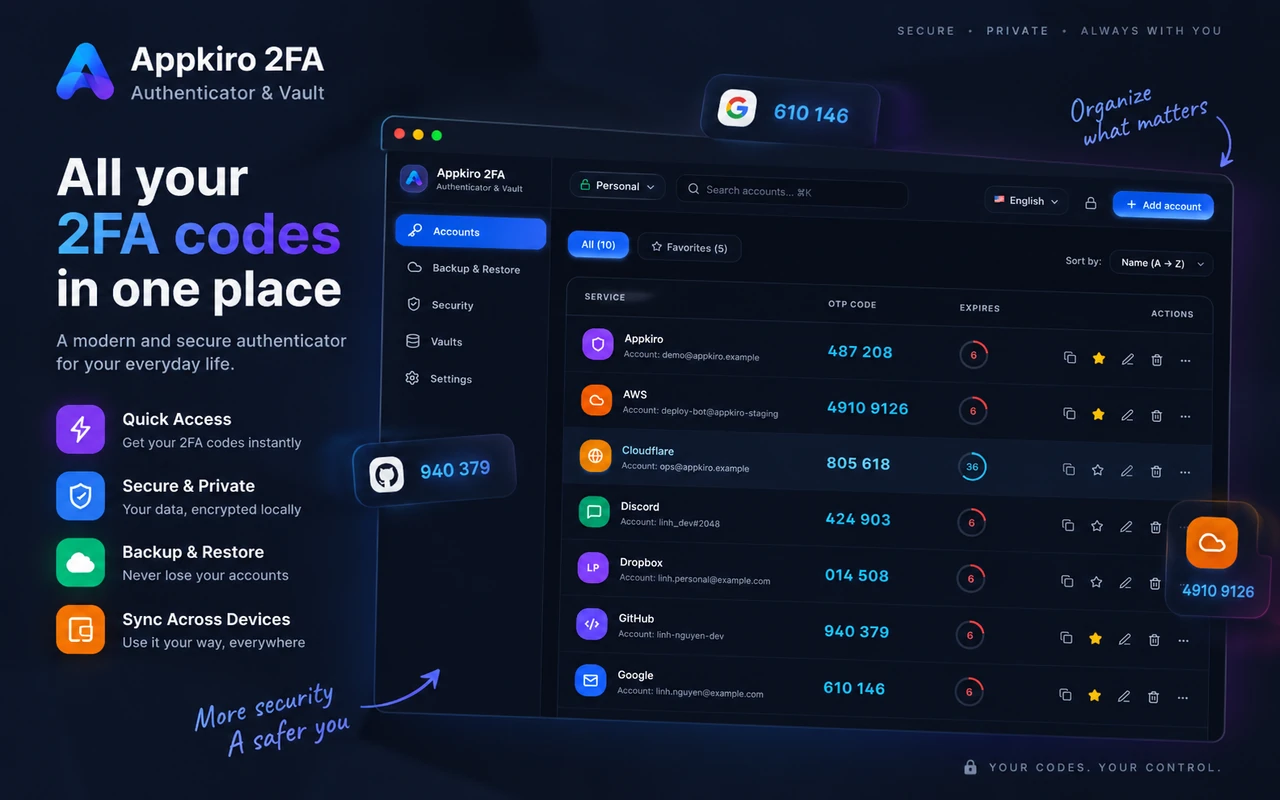
Switch seamlessly between toolbar popup, persistent Chrome side panel, and full dashboard views.
- Chrome Side Panel: Keep your 2FA codes pinned beside your browser tab. Perfect for intensive developer workflows, account management, and multi-site logins.
- One-Click Instant Copy: Click any 6-digit code to copy it directly to your clipboard, complete with an instant visual checkmark confirmation.
- ⌘K / Ctrl+K Instant Search: Jump straight to the code you need in milliseconds. Filter by service name, issuer, username, or custom tags.
- Favorites & Organization Tags: Tag tokens with Work, Personal, or Starred categories to keep dozens of development and production credentials organized.
Encrypted locally, never exposed to anyone
Your OTP secrets never leave your device unencrypted. Master keys are derived on your computer and secrets are wiped from RAM when locked.
AES-256-GCM Vault Encryption
All account records, issuer tags, and Base32 secrets are encrypted at rest using military-grade AES-256 in Galois/Counter Mode for authenticated integrity.
PBKDF2 Key Derivation (100,000 Rounds)
Your master password derives the vault encryption key using PBKDF2-HMAC-SHA256 with 100,000 iterations and a cryptographically random salt, repelling brute-force attacks.
Memory-Only Decryption & Auto-Lock
Decrypted OTP secrets exist only temporarily in volatile memory. Configurable inactivity timers clear keys from RAM immediately when idle.
Import & Setup
Effortless account setup in seconds
Import from Google Authenticator, scan QR codes right off your monitor screen, or paste secret keys manually.
- Screen QR Code Capture: Click to scan setup QR codes directly from the active Chrome tab. No need to hold up your phone camera to your computer monitor.
- Google Authenticator Migration: Seamlessly import all your accounts in bulk by scanning the standard otpauth-migration:// transfer QR code generated by Google Authenticator.
- Image Drag-and-Drop & Webcams: Drop screenshot files (.png, .jpg) onto the extension or use your laptop webcam to capture physical paper 2FA cards.
- Aegis, 2FAS & URI Import: Full interoperability with standard .json exports from Aegis Authenticator, 2FAS (.2fas), and plain otpauth:// URI lists with duplicate detection.
Access your 2FA on mobile via Telegram
Need your 2FA codes on your smartphone without downloading another native app? Use our official Telegram Mini App and Bot.
Kit2FA Telegram Mini App
A full graphical authenticator that launches immediately inside your Telegram messenger. View live TOTP codes, scan setup QR codes via your camera, and protect your vault with a master passphrase.
@kit2fa_bot
The official bot entry point for 2Fa Live on Telegram. Launch the authenticator mini app with one tap from chat, check guides, and manage authentication quick actions anytime.
Workflow
Getting started in four simple steps
From installation to seamless browser logins in less than two minutes.
Install extension & set master password
Add 2Fa Live to Chrome and choose a strong master password to initialize your local AES-256-GCM encrypted vault.
Add your 2FA accounts
Scan QR codes directly from the screen, import your Google Authenticator migration QR, or paste secret keys.
Copy codes with one click
Click the code icon or use the side panel to grab the current 6-digit TOTP token whenever a site asks for verification.
Save an encrypted backup
Export an encrypted .ak2fa backup file or connect the Telegram Mini App for cross-device peace of mind.
Audiences
Who uses 2Fa Live
Engineered for professionals who manage dozens of secure logins every day.
Developers & DevOps
Manage 2FA credentials for AWS, GitHub, Cloudflare, GitLab, DigitalOcean, and production database bastions with zero friction.
Remote workers & digital nomads
Speed through daily sign-ins for Google Workspace, Slack, Jira, Zoom, and company VPNs directly on your workstation.
Crypto traders & Web3 users
Secure exchange accounts (Binance, Coinbase, Kraken) with local-first encryption that is immune to SIM-swapping attacks.
Privacy-conscious individuals
Users who reject cloud-synced authenticators that require phone numbers, track logins, or leak metadata to big tech servers.
IT administrators & support
Easily manage shared test accounts and generate verification codes across multiple development environments without shared physical phones.
FAQ
Frequently Asked Questions
Direct answers regarding cryptographic standards, offline operation, and account safety.
What is 2Fa Live?
2Fa Live is a Chrome extension that generates and manages time-based one-time password (TOTP) two-factor authentication codes. Instead of reaching for your phone every time a site asks for verification, you can view and copy current codes directly in your browser.
What is a TOTP authenticator and how does it work?
TOTP (Time-based One-Time Password, RFC 6238) turns a shared secret key into a 6 or 8-digit numeric code that changes every 30 seconds. Both the browser extension and the login server calculate the exact same code independently from the current time, with no network exchange required.
How are my OTP secrets and private data protected?
All account records and secret keys are encrypted client-side using AES-256-GCM. Your master key is derived via PBKDF2-HMAC-SHA256 with 100,000 iterations and a unique salt. Decrypted keys only exist temporarily in memory and are cleared when the configurable auto-lock timer elapses or the window closes.
Does 2Fa Live work offline?
Yes. TOTP generation is purely mathematical and runs 100% locally on your machine using your system clock and stored encrypted secrets. You do not need an active internet connection to view or copy verification codes.
Can I import accounts from Google Authenticator?
Yes. 2Fa Live features a built-in batch migration parser for Google Authenticator transfer QR codes (the otpauth-migration:// protocol). It also supports unencrypted exports from 2FAS (.2fas), Aegis Authenticator (.json), and standard otpauth:// URL lists with duplicate detection.
Is any of my authentication data sent to a server?
No. By default, 2Fa Live operates completely local-first: your secrets never leave your device. If you optionally configure end-to-end encrypted (E2EE) multi-device sync, only encrypted ciphertext is transmitted. The server has zero knowledge of your encryption keys or OTP secrets.
What is the .ak2fa backup file format?
The .ak2fa format is a password-protected, encrypted backup envelope. When exporting, 2Fa Live runs an automated cryptographic self-verification test to guarantee the backup can be successfully decrypted before letting you save it to disk.
Does 2Fa Live replace my passwords?
No. Two-factor authentication (2FA) is an extra layer of defense that complements your password. You still enter your regular account password first, then provide the one-time code from 2Fa Live to verify your identity.
Can I use 2Fa Live on mobile or via Telegram?
Yes! You can use our official Telegram Mini App (https://t.me/kit2fa_bot/kit2fa) and Telegram Bot (https://t.me/kit2fa_bot). It works seamlessly on iOS, Android, macOS, and Telegram Web without requiring a standalone app download. It offers the same zero-knowledge client-side encryption, local TOTP generation with live countdown rings, and camera-based QR code scanning.
Is 2Fa Live free to use?
Yes. 2Fa Live is completely free, privacy-first, and requires no account creation or subscription.
Related Tools
Security and developer tools on AppKiro
Complimentary privacy-first browser utilities to support your security workflow.
- QR Code GeneratorGenerate QR codes from secret keys or otpauth URLs for secure setup.
- QR Code ReaderScan and decode 2FA setup QR codes from screenshots or local image files.
- Password GeneratorGenerate high-entropy master passwords to secure your encrypted vault.
- Key GeneratorProduce cryptographically secure random keys and Base32 secrets.
- JWT DebuggerInspect and decode JSON Web Tokens after completing a secure login flow.
- Base64 to TextDecode and inspect Base32 and Base64 authentication parameters.
Take control of your two-factor authentication in Chrome
Install 2Fa Live to enjoy zero-knowledge security, one-click code copying, and seamless cross-platform recovery.